Zetatrack: A Chrome Extension for Tracking Zetamac Progress in Google Sheets
Zetatrack is a free Chrome extension developed by alexhalpin00 that allows players of the popular zetamac mental arithmetic game to track their progress in a Google Sheet. With this extension, players can easily monitor their scores and performance over time.
To get started, simply install the Zetatrack extension from the Chrome Web Store. Once installed, a new icon will appear in your browser's toolbar. Click on the icon and add a valid Sheet ID by following the instructions provided. The Sheet ID is the ~44 character identifier found in the URL of your Google Sheet.
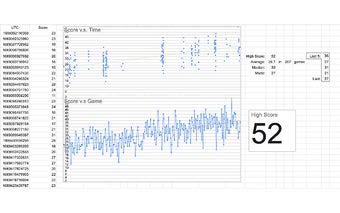
After adding the Sheet ID, Zetatrack will automatically add a new row to columns A and B at the end of each round. The new row will contain the time (in UTC) and the player's score. This makes it easy to keep track of your progress and see how you're improving over time.
It's important to note that Zetatrack currently only supports recording the scores of games with default difficulty and parameters. The extension is designed to work seamlessly with zetamac and provide a convenient way for players to track their scores without any hassle.
If you're an avid zetamac player and want to keep a record of your progress, Zetatrack is a must-have Chrome extension. Install it today and start tracking your zetamac scores in Google Sheets!